Early accessThe self-hosted alternative to cloud trading APIs

Scale your trading infrastructure as you grow. Secure and managed from day one.

One dashboard, one API and risk limits for your entire trading fleet. Fully on-premises, so your broker passwords never leave your servers.

Fully on-premises Any MT5 broker, demo accounts Credentials stay with you No blind restarts

Architecture

Follow an order through PerkBridge.

Access, management and execution are separate layers, all deployed on your own infrastructure. Every order is authenticated, routed and risk-checked locally before it reaches the broker, and execution servers run independently of the control plane.

YOUR PREMISES mutual TLS dials out Your EAs, botsand trading appsREST · OpenAPI 3 ACCESSwhat your apps call HTTPS gatewayTLS certificates Trading APIorders · tokens MANAGEMENT PLANEhow you run the fleet Dashboardweb app Fleet managerprovision · deploy Risk policiesrules per account Monitoringhealth · alerts Audit logevery action Single sign-onOIDC · roles Agent gatewaymutual TLS · signed commands to servers PostgreSQLstate · journal · backups Access and management ship as one installon one Ubuntu server · guided installer CONTROL PLANE OFFLINE RUNTIME PLANE · WHERE TRADING HAPPENS Trading server 1Fleet AgentMonitoringacc 1 · MT5MT5 terminalBridgeRiskengineacc 2 · MT5MT5 terminalBridgeRiskengineacc 3 · MT5MT5 terminalBridgeRiskengine Trading server 2Fleet AgentMonitoringacc 4 · MT5MT5 terminalBridgeRiskenginecTraderOpen APIConnectorRiskengineSOONBinanceREST · WSConnectorRiskengineLATER ✓ Risk check passed ✕ Refused · over daily loss limit Health checked, alert raised STILL RUNNING STILL RUNNING Brokers andexchangesAny MT5 broker todaycTrader coming soon ✓ Order filled
1
Your app sends one API callThe gateway terminates HTTPS and the Trading API authenticates a token scoped to that account or strategy.
2
Access checks it, management records itThe Trading API checks the account, its limits and any halt, then routes the order to the right server. The audit log records the request.
3
Delivered over the agent’s own connectionThe Fleet Agent dials out to the agent gateway and proves its identity with mutual TLS. The order arrives as a signed command, and no Docker API is ever exposed.
4
The risk engine checks the order firstEvery account has its own risk engine next to the terminal. Loss, exposure, rate and market limits are checked before anything is sent.
5
The terminal sends it to your brokerMT5 today, on demo accounts. cTrader is coming soon on the same API and risk engine; crypto exchanges are a direction, not a commitment. Your broker connection is the only link that leaves your premises, and credentials go only to your broker.
6
A risky order is refused on the spotOver the daily loss limit? The risk engine refuses new exposure locally, even if nothing else can be reached.
7
Monitoring alerts, nothing restarts blindlyHost, container, terminal, bridge and broker health are checked all the time, and problems raise alerts. A terminal that stops responding is not restarted on its own, so a blind restart cannot open duplicate orders. After a server reboot, deployments start again by default, and you can turn that off.
8
Control plane offline? Your servers keep runningTerminals stay logged in, open positions stay as they are, and risk limits keep holding. New API orders cannot be placed until the control plane is back, closing positions on the server stays possible, and nothing is restarted or deleted while the link is down.

The product

The dashboard you will actually use.

Screens from the current early-access build, shown with sample data. Servers, accounts, risk limits and health on one page, with no remote desktop.
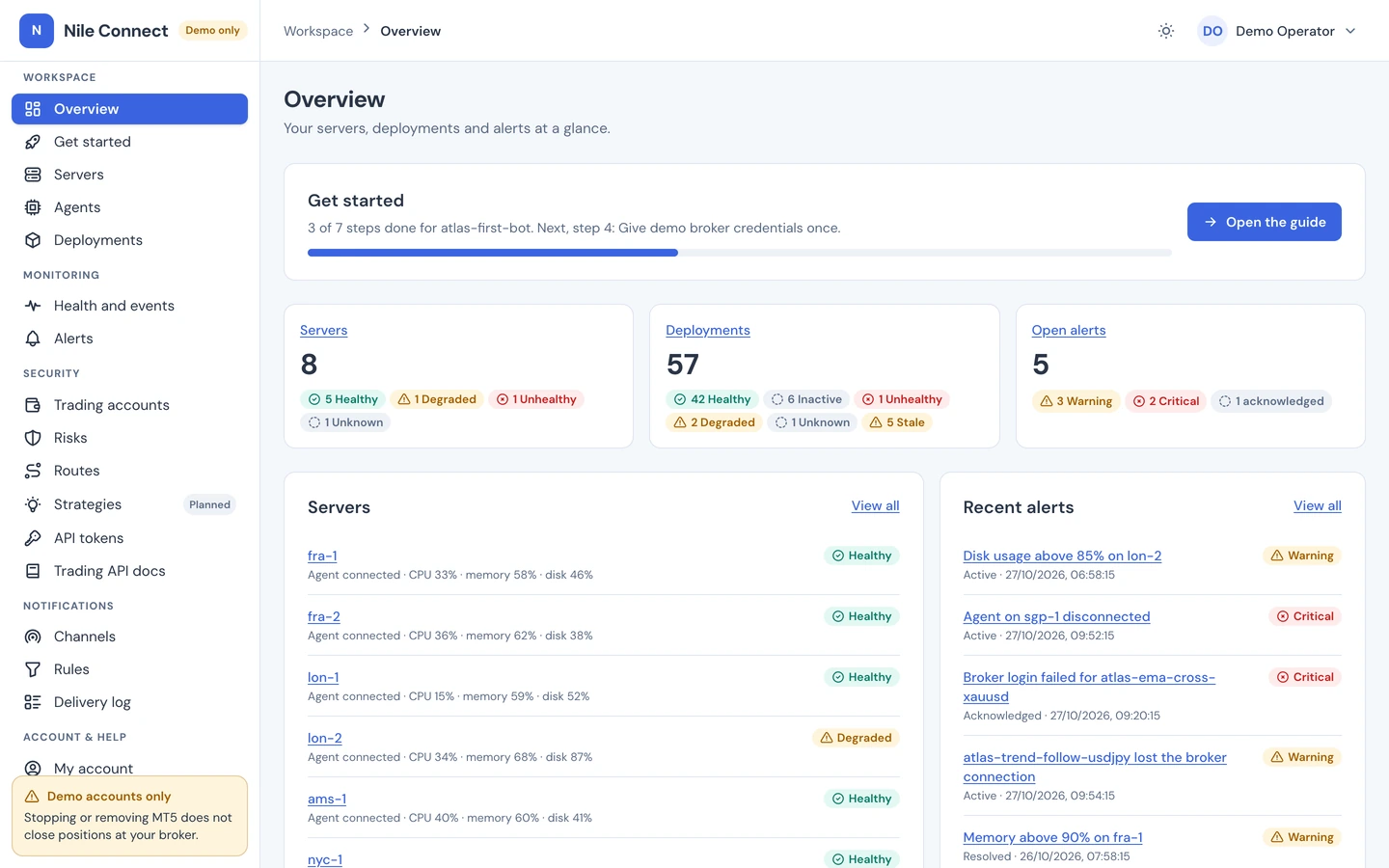
PerkBridge dashboard overview: eight servers, 57 deployments, open alerts, the setup guide and the server list
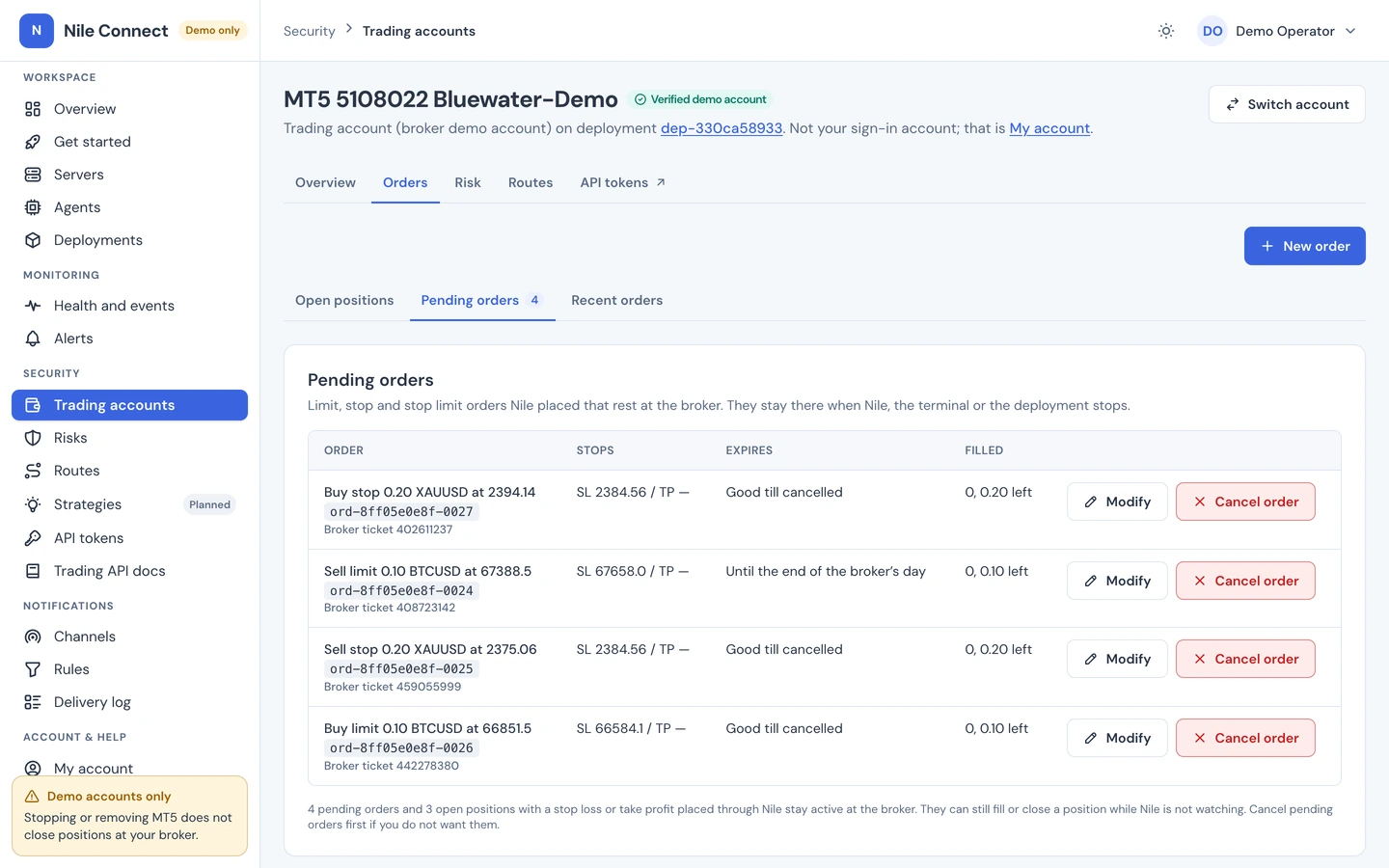
Pending orders on a trading account: buy and sell stop and limit orders with stop loss, expiry, modify and cancel
Pending ordersLimit, stop and stop-limit orders with stop loss, take profit and expiry. Modify or cancel them from the dashboard or the API.
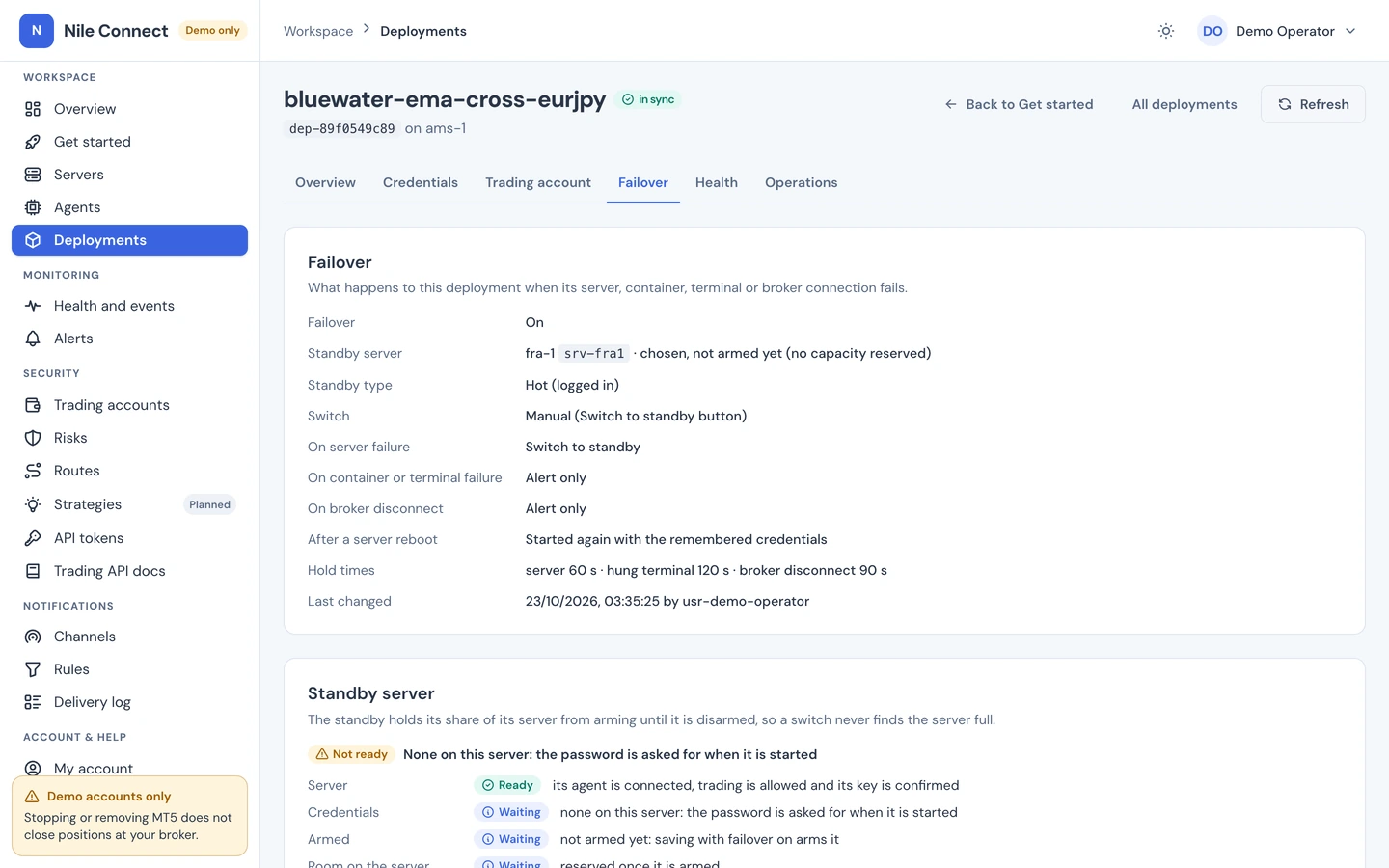
Failover tab of a deployment: failover on, a standby server chosen and what happens on server, terminal or broker failure
Failover to a standbyChoose a standby server and what happens when a server, terminal or broker connection fails. Switch automatically or with one button.
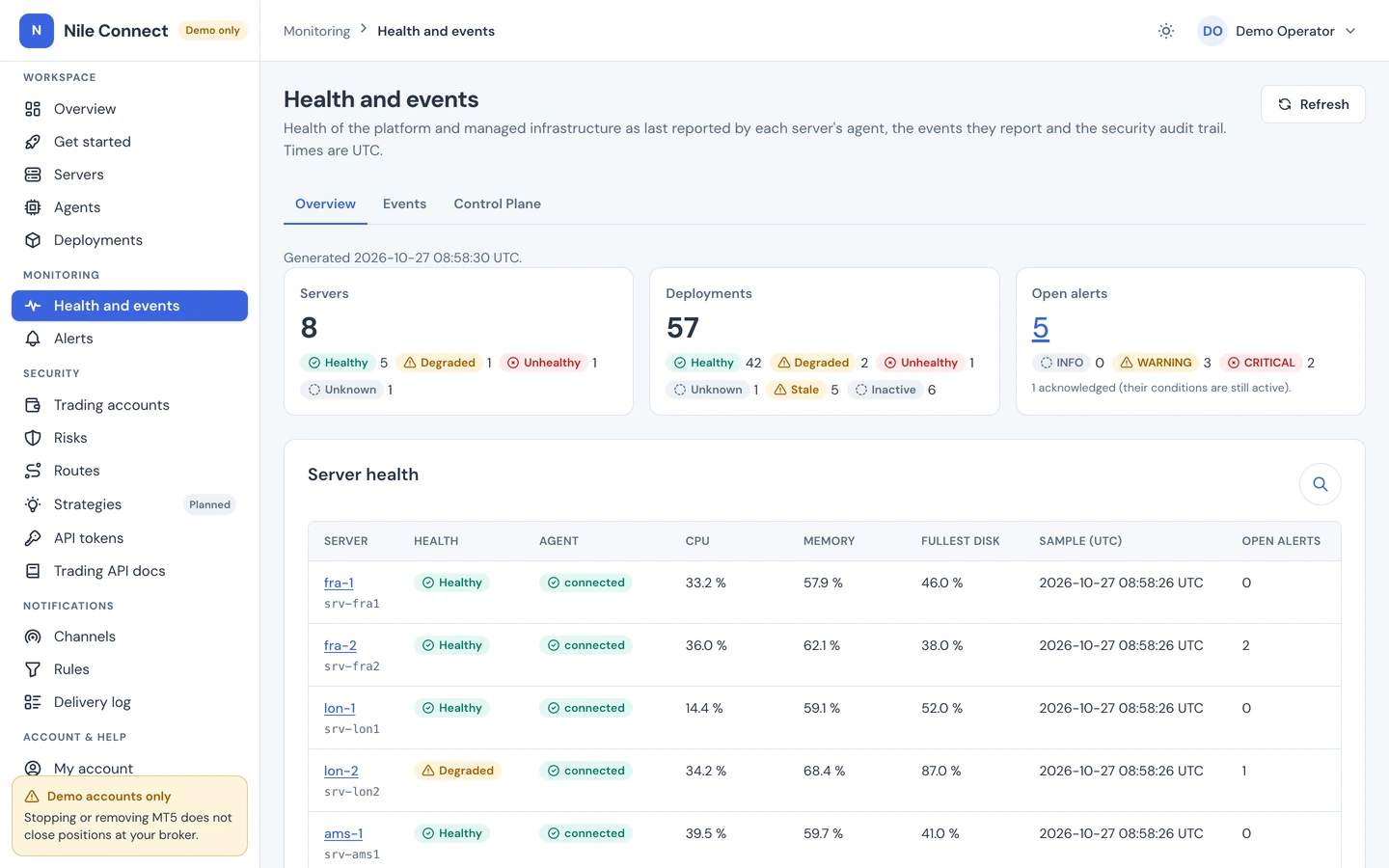
Health and events page: server, deployment and alert counts with CPU, memory, disk and agent status per server
Health and eventsCPU, memory, disk and agent status per server, with alerts, notifications and a full audit trail.
Request a demo sandbox Sample data. Sandboxes are approved by hand.

Why PerkBridge

Today you pick two of three: control, convenience, custody. Get all three.

Cloud APIs are convenient but hold your passwords. A rented VPS keeps them, but you manage every terminal by remote desktop. PerkBridge gives you the cloud experience on servers you own.

WHAT YOU NEED
Cloud trading API
VPS + remote desktop
DIY containers
PerkBridge
Runs entirely on your premises
No
Rented VM
Terminals only
Yes
Broker password stays with you
Vendor holds it
Yes
Yes
Yes
Many accounts from one dashboard
Vendor-run
One desktop per VM
Build it yourself
Yes
One API across accounts
Yes
No
Per terminal
Yes
Health alerts, no blind restarts
Vendor-managed
Manual restarts
Health check only
Yes
Risk rules before every order
Some products
In your EA only
No
Yes
Failover to a standby server
Paid tiers
No
No
✓ Included
Based on public information about products in each category, October 2026. Moving from a hosted API →See the full comparison →

Fully on-premises

The whole platform runs inside your perimeter.

Not just the terminals. The control plane, its database, single sign-on, the agents and every trading environment install on hardware you choose: your data centre, your private cloud or any Ubuntu 24.04 LTS server. Nothing runs in our cloud, and trading never depends on us being online.

Your data centre Private cloud Any VPS provider Docker Compose install
Read the install guide →
YOUR PREMISES
Control plane and dashboard
database · single sign-on · audit log · API
mutual TLS
Trading server 1
agent · terminals · risk
Trading server 2
agent · terminals · risk
Your brokers
the only outside link
PerkBridge cloud
not required

Connectors

MT5 today. cTrader coming soon.

A connector turns a trading platform into the same API, dashboard and risk rules. MetaTrader 5 is the only connector today. cTrader is coming soon. Other platforms and crypto exchanges are a direction we are exploring, with no dates.

Universal API

Write your strategy once, against one API.

A single REST API, specified in OpenAPI 3, for quotes, bars, symbols, positions, orders and history. Today it trades MT5 demo accounts with market, limit, stop and stop-limit orders, time in force (GTC, day, GTD), modify and cancel for pending orders, and full closes. Coming next: DirectConnect, an opt-in low-latency order path over a TLS WebSocket, designed and not built yet.

  • Idempotent orders: a retried request never fills twice
  • Scoped tokens per account and per strategy route, expiring after 90 days by default
  • A full timeline for every order, from request to broker reply
  • Halt one account or the whole fleet with one call, or with the emergency stop in the dashboard
Explore the Trading API reference →
Place order Positions Quotes
POST /v1/trading/accounts/{account}/orders
Authorization: Bearer $TRADING_TOKEN
Idempotency-Key: ea42-0007

{
  "client_order_id": "ea42-0007",
  "symbol": "EURUSD",
  "side": "buy",
  "volume": "0.10"
}
Works today onMT5 demo accountsComing sooncTrader

Infrastructure

Your servers become a managed trading fleet.

Bring any Ubuntu 24.04 LTS VPS or dedicated server. PerkBridge installs everything it needs and keeps every account running, even when the dashboard is offline.

YOUR FLEETmTLS · agent v1
vps-frankfurt-01● Healthy · CPU 31%
MT5 · acc 1MT5 · acc 2MT5 · acc 3MT5 · acc 4
vps-amsterdam-02● Healthy · CPU 24%
MT5 · acc 5MT5 · acc 6MT5 · acc 7free slot
dedicated-london● Agent reconnecting
2 accounts keep running locally. Nothing is restarted or deleted while the link is down.
standby-frankfurt● Standby armed
Takes over an account if its server fails. Checked against the broker first, so nothing trades twice.
One-click provisioningAdd a server by address. SSH identity is verified and the credential is temporary.
Isolated environmentsEvery account in its own version-pinned container, with its own resources.
Monitoring and alertsServer, container and broker link health in real time, with alert history.
Signed image catalogPick a platform and the latest signed runtime is downloaded to your server, then the deployment is created.
Failover to a standbyArm a standby server per deployment and switch by hand or automatically, without sending an order twice. Included.
Works offlineExecution never depends on the control plane being reachable.
Ephemeral sessionsShort-lived environments with verified cleanup of session data.
Explore the platform →

Security

Your keys stay yours. By design, not by policy.

Cloud trading APIs keep your broker passwords on their servers. With PerkBridge the control plane and the terminals both run on your infrastructure, so credentials never reach us at all. Read the security overview →

Credentials stay with youSealed to your server for each start and never stored, unless you opt in to keep it split between your server and your control plane. Never in source, images or logs, and never on our servers.
Mutual TLS everywhereEvery agent proves its identity, and only your registered servers can reach the agent gateway. All control traffic is authenticated and encrypted.
Verified images onlyVersion-pinned runtime images, trusted only from ghcr.io/perkbridge and approved by you. Nothing else runs.
Least privilegeNo exposed Docker API, no socket access for containers, separate roles for operators and viewers.
Single sign-onSign in through your own identity provider with OIDC, or the bundled Keycloak.
Complete audit logEvery privileged action is authorised and recorded: who, what and when.

Notifications

Alerts in the dashboard and in your channels.

Every alert is in the dashboard and the API, with acknowledgement and history. Alerts can also go to Telegram, Slack, email and signed webhooks, sent by a separate notifier with retries and a delivery log.

SLSlackAvailable
TGTelegramAvailable
@Email and webhooksAvailable
INIn the dashboardAvailable today, with history
  • Rules choose which alert types go to which channels
  • A minimum severity per rule, so a warning never wakes you at night
ILLUSTRATION · SAMPLE MESSAGES
Telegram · Risk09:42Daily loss limit reachedChallenge account 02: new orders blocked until the next trading day. Closing positions is still allowed.
Slack · #ops09:31Server disk almost fullfra-01 is at 81% disk. 4 deployments keep running.
Email · Risk09:12Order refused by a ruleRoute ea-scalper: 2.50 lots is above the 2.00 lot limit per order.
Slack · #ops08:55Server back onlineldn-02 reconnected. All 5 deployments are healthy.

Risk management

Every order passes your rules first.

The risk engine runs inside each trading environment, next to the terminal. Limits hold even if the dashboard is unreachable, and a rule that cannot be evaluated refuses new exposure instead of letting it through. Closing a position always stays possible.

Loss limitsDaily, weekly and monthly
Exposure limitsVolume, positions, per symbol
Order rate limitsOrders per minute, trades per day
Market guardsStale quotes and wide spreads
Time rulesTrading hours, market close and news windows
How risk rules work →
Risk rules · account acc 2Active
Daily loss$640 of $1,000
Open positions4 of 10
Trades today37 of 200
When a limit is hit: Block new exposure Block and close (coming soon)
Order refused: BUY 0.50 GBPUSD would exceed the max position volume for GBPUSD.

For prop-firm traders

Starting points for challenge rules.

Set each account’s limits a step inside your firm’s rules, so a bad day stops on your server before it breaks the challenge. Example values for a 100,000 USD account; check your firm’s own terms.

EVALUATIONChallenge phaseRoom to trade, with a buffer below a 5% daily loss rule.
Daily loss limit4,000 USD
Open positions at most5
Largest order2.00 lots
Trades per day at most200
FUNDEDFunded accountTighter limits once real payouts depend on it.
Daily loss limit2,500 USD
Open positions at most3
Largest order1.00 lots
Trades per day at most100
EA ON MANY ACCOUNTSCopy across accountsThe same limits on every account an EA trades, set once per account.
Daily loss limitper account
Orders per minute at most10
Largest position per symbol1.00 lots
Oldest quote accepted2 seconds
These use the risk limits available today, on MT5 demo accounts. There are no one-click templates yet. Write your own rules →

Get started

See it running today.

Early access is limited to broker demo accounts. Start with the shared demo, or ask for a private sandbox.

AVAILABLE NOW Shared live demo The full dashboard on a sample fleet that runs in your browser, with no sign-up and no broker account. Sign in with demo@perkbridge.eu and the password demo. Open the live demo
PRIVATE Request a sandbox
We reply personally by email.

FAQ

Common questions

Is PerkBridge a cloud trading service?

No. The whole platform runs on your premises: the control plane, its database and sign-in, the agents and every trading terminal. Nothing runs in our cloud, and nothing from us is needed to keep trading.

How is this different from a cloud MetaTrader API?

A cloud API runs the terminals in the vendor’s data centre and keeps your broker password there. PerkBridge gives you the same kind of API, but the terminals, the control plane and the credentials stay on servers you own.

Do I need one VPS per account?

No. Each account runs in its own isolated environment, so one server can hold several accounts. You add capacity by adding servers from the dashboard.

Which platforms and brokers are supported?

MetaTrader 5 with any broker, on demo accounts. You install MT5 from MetaQuotes or your broker; PerkBridge does not bundle it. cTrader is coming soon on the same API. Other platforms are a direction only, with no dates.

Does removing an environment close my positions?

No. Removing an environment or a server never closes broker positions. Close positions first; the dashboard warns you before any removal.

Can I use a live account?

Not yet. During early access PerkBridge works with broker demo accounts only, and other accounts are refused. Real-money accounts are planned.

Your fleet. Your servers. Your rules. Request a sandbox with one short form.